VoIP — The Latest Phone Systems For Mortgage Professionals

Is Voice Over Internet Protocol the right choice for you?

VoIP for Pros

Understanding VoIP Phone Systems

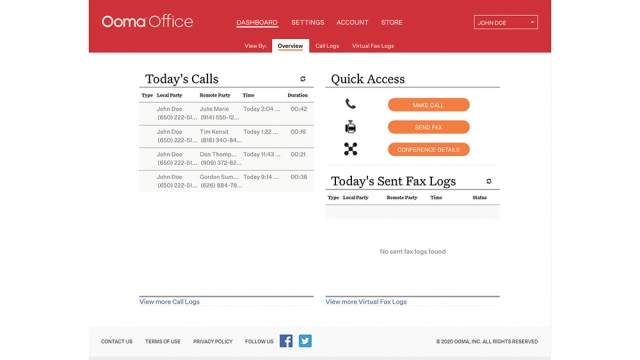
Voice over Internet Protocol (VoIP) phones use the internet to make and receive phone calls using IP (Internet Protocol) or analog phones plugged into Ethernet jacks. Once connected, you can easily make and receive calls. Using a web portal and login, you can customize numerous features, including the Virtual Receptionist welcome message or adding new users.

The difference between traditional landline phones and VoIP systems is technology. Landline phones require an intensive infrastructure of exchange hardware and wiring, allowing one to make and receive calls only.

VoIP technology has changed how companies communicate. While IP capabilities have been around several decades, VoIP has advanced in recent years, thanks to innovation and faster internet speeds.

How VoIP works

How VoIP Systems Work

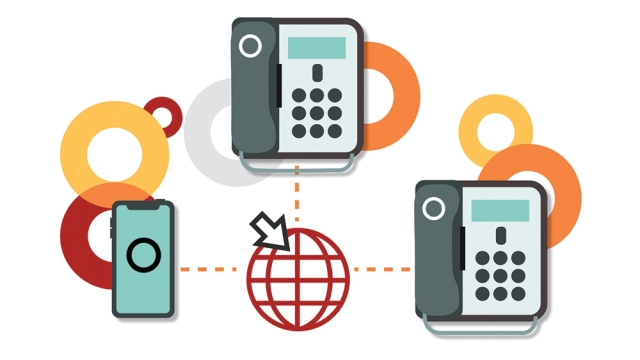
VoIP phones work by turning your voice into data, which is then transmitted over the internet, like sending emails.

If you’ve used Skype, you’ve used VoIP. VoIP calls are made on your phone, connected to the internet with a network cable or adapter, or via a computer’s microphone and speakers using an app. When making calls, the VoIP service provider routes the voice data between you and the other caller — all within a split second.

VoIP Transforms Communications

Unlike traditional landlines, VoIP comes with built-in features that help make the right impression.

• Virtual Receptionist — when you can’t have a ‘live’ person answer the phone, Virtual Receptionist steps in. This allows callers to hear a message with numerous options, versus hearing a busy signal or being quickly put on hold.

• Ring Groups — to ensure every caller has a positive experience, you can program Ring Groups to ring simultaneously — so everyone in a department, like sales or customer care, receives the call; or ring sequentially — from person to person, until someone picks up.

• Virtual Fax — faxing remains an important form of communication for many businesses. With VoIP phone systems, you can still send traditional faxes from your phone to a fax machine. Virtual Fax removes the need for fax equipment. Faxes are converted to PDF files and managed within the end-user portal. Each user who needs access will have fax capabilities via their phone extension.

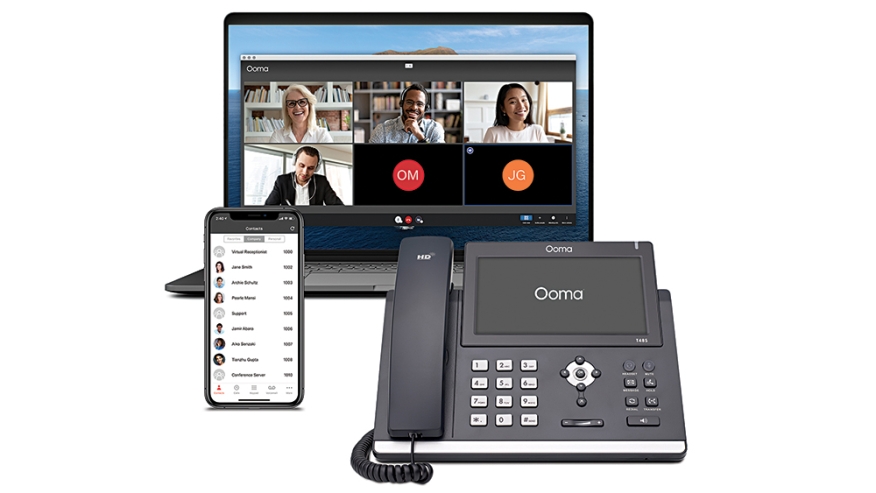
VoIp phone systems

• Conference Calling — if conference calls are an integral part of your work, you understand the need for a conference phone that delivers the perfect sound. If callers find it hard to hear participants, the meeting will be challenging. To ensure everyone experiences in-person call quality, look for a conference phone with the following features: a 360° voice range; an array of built-in microphones; and echo cancellation background noise suppression

• Remote Working — Employees shouldn’t use their personal phone numbers for business. VoIP, unlike landlines, allows employees to work anywhere, using their business phone number, through mobile and desktop apps, and voice messages forwarded as email attachments.

• Business Phone Number — transitioning to VoIP is easy as you can keep your current business number by working with your VoIP provider. So, there’s no need to change your letterhead, business cards, or website.

VoIP web portal

How to Set Up an IP Phone System

Setting up a business VoIP system literally just takes minutes.

One of the differences businesses notice when switching to a VoIP system is the reduction in on-premises equipment. Traditional business phone systems require the installation of large wall-mounted fixtures, followed by upgrades and IT servicing.

With VoIP systems, the hardware generally consists of one or two compact, plug-in pieces. When it comes to switching your phones to VoIP, you have device options. You can continue using your existing analog or digital desk phones, or if you’d like to upgrade, you can purchase IP phones.

Once your desk phones and starter kit arrive, follow a few simple steps:

  • Connect your base station (a tablet-sized router that sorts out voice data and traffic to ensure clear, reliable calls) to your analog phone.
  • Plug in wireless extensions (into regular power outlets) to connect analog phones to the internet.
  • Connect IP phones to an Ethernet jack.

Key Advantages of VoIP

• Important Impressions — how customers and prospects view your business often depends on their initial phone interaction. Do they hear a welcome message with easy directions, or be put on hold immediately? Whether your business has two, 20 or 50+ employees, your business will sound professional with a VoIP phone system.

• Call Quality — VoIP provides the quality of phone calls businesses desire through increased internet speeds and advances in technology.

• Cost Savings — a huge benefit to transitioning to VoIP is the cost savings. For those with landlines, it’s clear how expensive they are — from setup, to recurring monthly costs, adding features and ongoing IT support. To understand what you could save with a VoIP system, use the VoIP Savings Calculator.

• Work Anywhere — VoIP systems are flexible, providing the tools to communicate with employees no matter where they are working — in the office, on the road or at home.

This article originally appeared in National Mortgage Professional, on the week of December 1, 2022.
About the author
Jim Gustke is vice president of marketing at Ooma and is responsible for all aspects of marketing and customer acquisition at the company. For more information, visit: www.ooma.com.
Published on
Nov 30, 2022
More from NMP Magazine
NMP
Not Your Conforming Comfort Zone

Non-Agency originations could reach $500 billion this year. Are you ready to tap in?

Tom Davis
NMP
The Liquidity Squeeze In FHA Servicing

The long tail of loss mitigation is now coming into view as FHA’s post-pandemic relief tools give way to repeat defaults, exhausted options, and a swelling foreclosure pipeline

Katie Jensen
NMP
The NEXA Disruption

A bold rebrand tests the broker–retail divide

Katie Jensen
NMP
The More AI, The More LO

AI makes human loan officers more essential, not less

John Cady
NMP
Homes For People, Not Portfolios

Trump’s housing directive targets bulk buyers — but the real impact hinges on definitions, supply, and migration to build-to-rent

Seamus Nally
NMP
The Offense Mindset For M&A

Lenders turn consolidation into a competitive weapon

Katie Jensen

Webinars

The CEO Mindset: 5 Daily Successful Routines

In this webinar, NMP CEO Andrew Berman sat down with GMCC's James Jin, CEO and President, alongside four of th...

Webinar
May 28, 2026
Investor Confidence in Today’s Non-QM And Why Originators Are Paying Attention... A Virtual Town Hall

We host Angel Oak Mortgage Solutions for a special 2021 edition of their virtual town hall series they ran fro...

Webinar
Apr 08, 2021
How to Help Real Estate Pros in a Post-Refi World

Hear from Melissa Merriman, REALTOR® with The Melissa Merriman Team at Keller Williams, on what real estate pr...

Webinar
Mar 18, 2021
Connect with your local mortgage community.

Meet your your colleagues, both national and local, by attending an event in your area.